Choose real-time, accelerated, or both
Last updated: October 9, 2026
On the Study type step you decide how each product is tested and for how long.
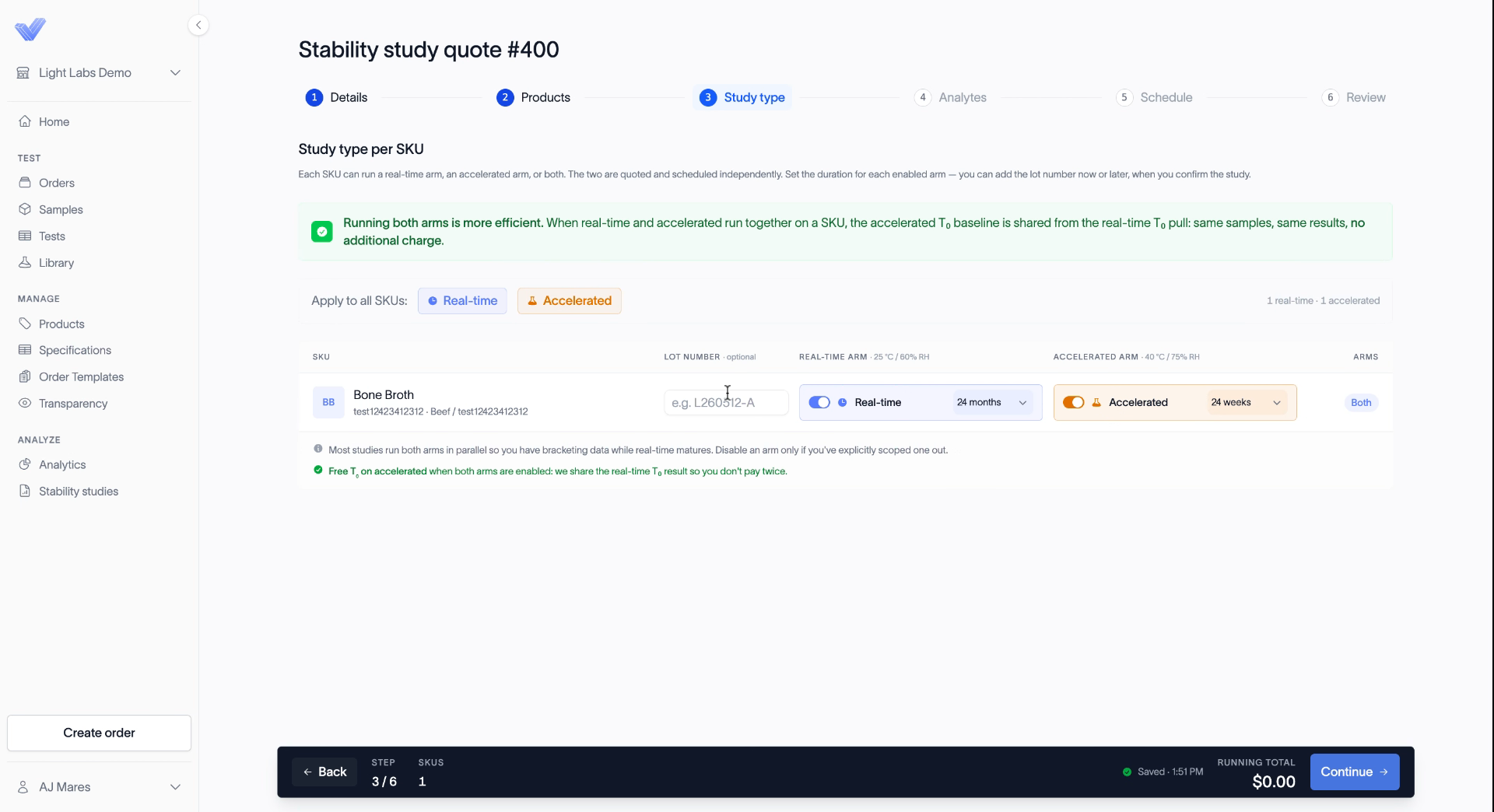
The two study types
Real-time is stored at 25 °C and 60% humidity. It's the long-term test that validates your shelf life.
Accelerated is stored at 40 °C and 75% humidity. It brackets the data while real-time runs.
Most studies run both together. Running both is also more efficient: the accelerated T0 baseline reuses the real-time T0 result, so you aren't charged for it twice.
Set up each product
Under Apply to all SKUs, click Real-time, Accelerated, or both to set the same type on every product at once. Skip this if you only enrolled one product.
In each product's row, turn Real-time or Accelerated on or off.
Set the duration for each arm that's on.
Real-time duration is in months. For a four-year shelf life, select four years.
Accelerated duration is in weeks.
Optionally, enter a Lot number. You can also add it after the quote is approved.
Click Continue.
Related
Select products for a stability study
Choose analytes for a stability study
Build your sampling schedule