Ship samples for a stability study
Last updated: October 9, 2026
Right after you confirm your study, you'll get shipping instructions for your samples. The shipping instructions are also your chain of custody form, so there's only one document to print.
Get your shipping instructions
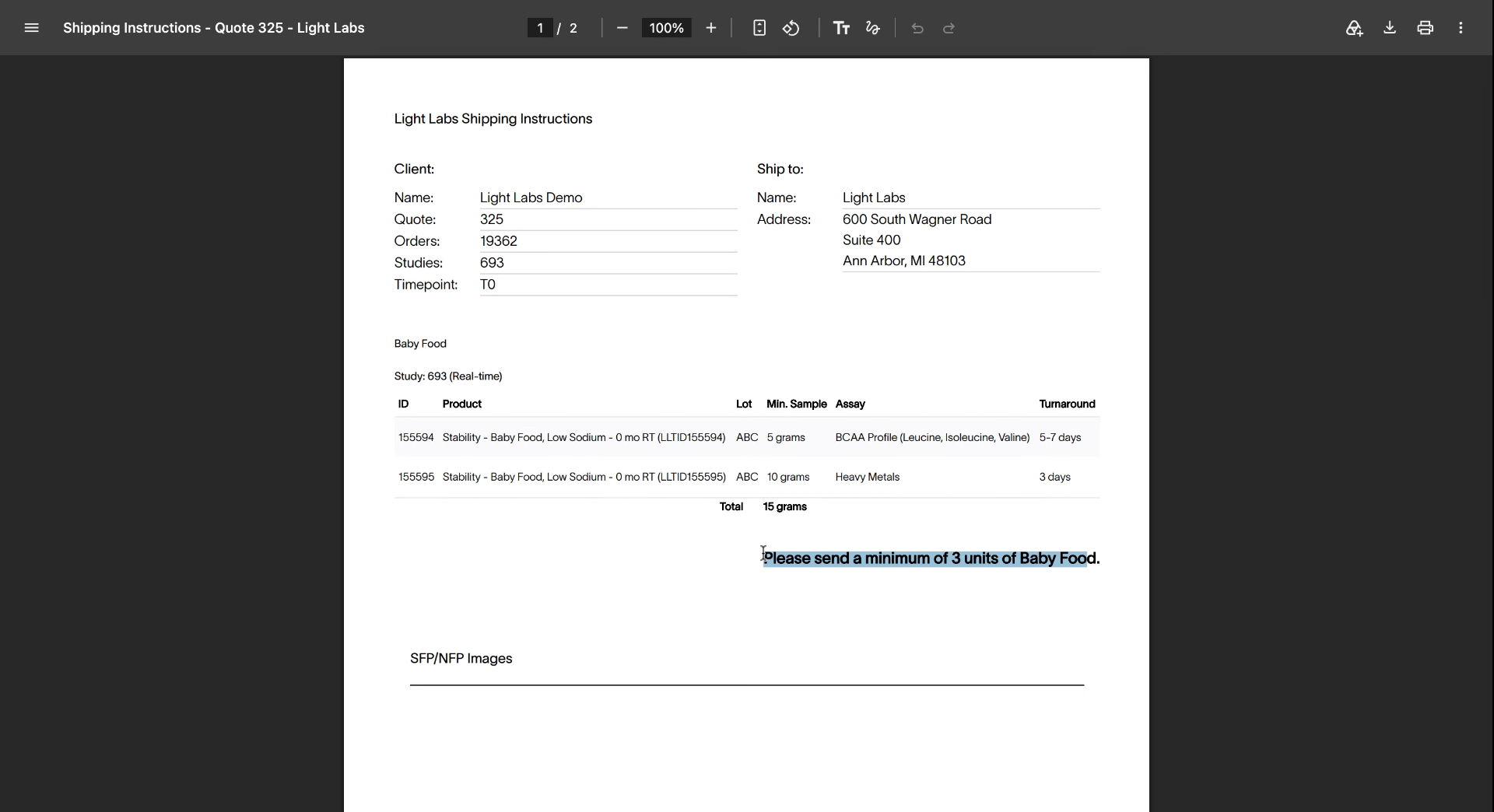
When you click Confirm & start study, the shipping instructions open. They're titled Shipping Instructions - Quote [number].
The document lists:
Your account, the quote number, the order, the study, and the time point (T0).
The ship-to address for the lab.
Each product, its lot number, the minimum sample amount, and the assay.
How many units to send. For example: "Please send a minimum of 3 units of Baby Food."
Ship your samples
Print the shipping instructions.
Pack at least the minimum number of units for each product.
Include the printed document in the shipment with your samples.
How many units to send
The minimum depends on how many tests and time points are in your study, so a bigger schedule needs more product. The shipping instructions give the exact number for your study, and the quality team also shares it during review.
Related
Approve and start your stability study
What happens during quality review