Build your sampling schedule
Last updated: October 9, 2026
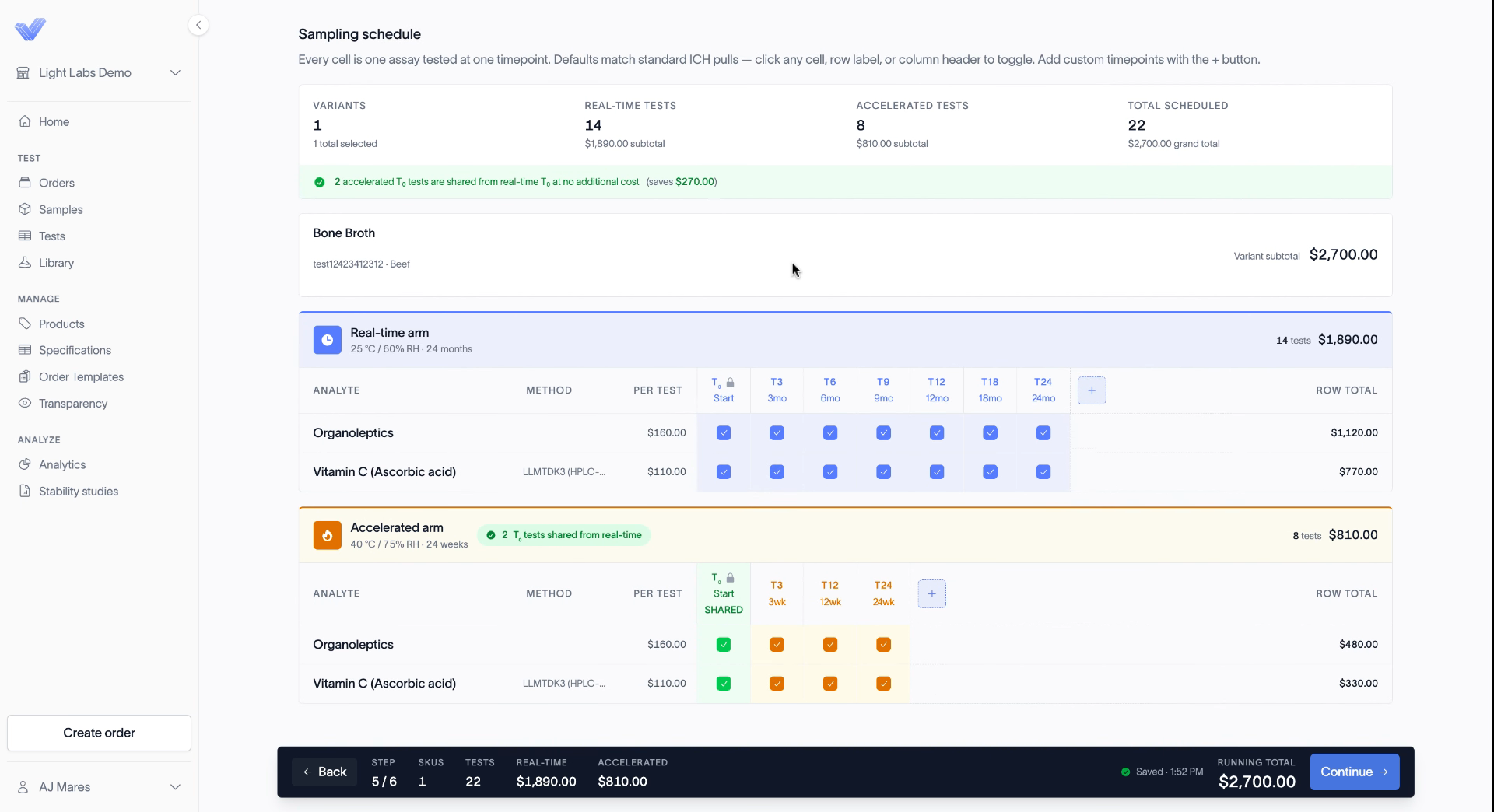
The Schedule step is where you customize the study. Every cell in the schedule is one test at one time point. The defaults follow standard ICH pulls, so you can leave them as they are or adjust them.
Read the schedule
At the top, the summary shows your variants, real-time tests, accelerated tests, and the total scheduled, with a cost for each. Below, the real-time and accelerated arms each have their own grid. Rows are your tests, and columns are time points.
T0 is required
T0 is the baseline read. Every test needs a starting value, so you can't remove T0.
If you run real-time and accelerated together, both arms share the T0 result. A note on the schedule shows how much you save, and you aren't charged for T0 on the accelerated arm.
Choose which tests run at each time point
Switch tests on and off for the time points you want:
Click a cell to turn one test on or off at one time point.
Click a test name to select or deselect that test across every time point.
Click a time point header to run all the tests at that time point.
The totals and the running total at the bottom update as you go.
Add a time point
To add a time point that isn't on the schedule, click the + button at the end of an arm. See Add custom time points.
When the schedule looks right, click Continue.
Related
Add custom time points
Choose analytes for a stability study
Review and submit your stability quote
How stability study billing works