Filter the tests list
Last updated: August 14, 2026
Time To Completion: 1 minute
Narrow the Tests page to the tests you care about. Filters stack, so you can combine several at once, and the list reloads as you go.
Prerequisites: The Tests page open with at least one test.
1. Open a filter
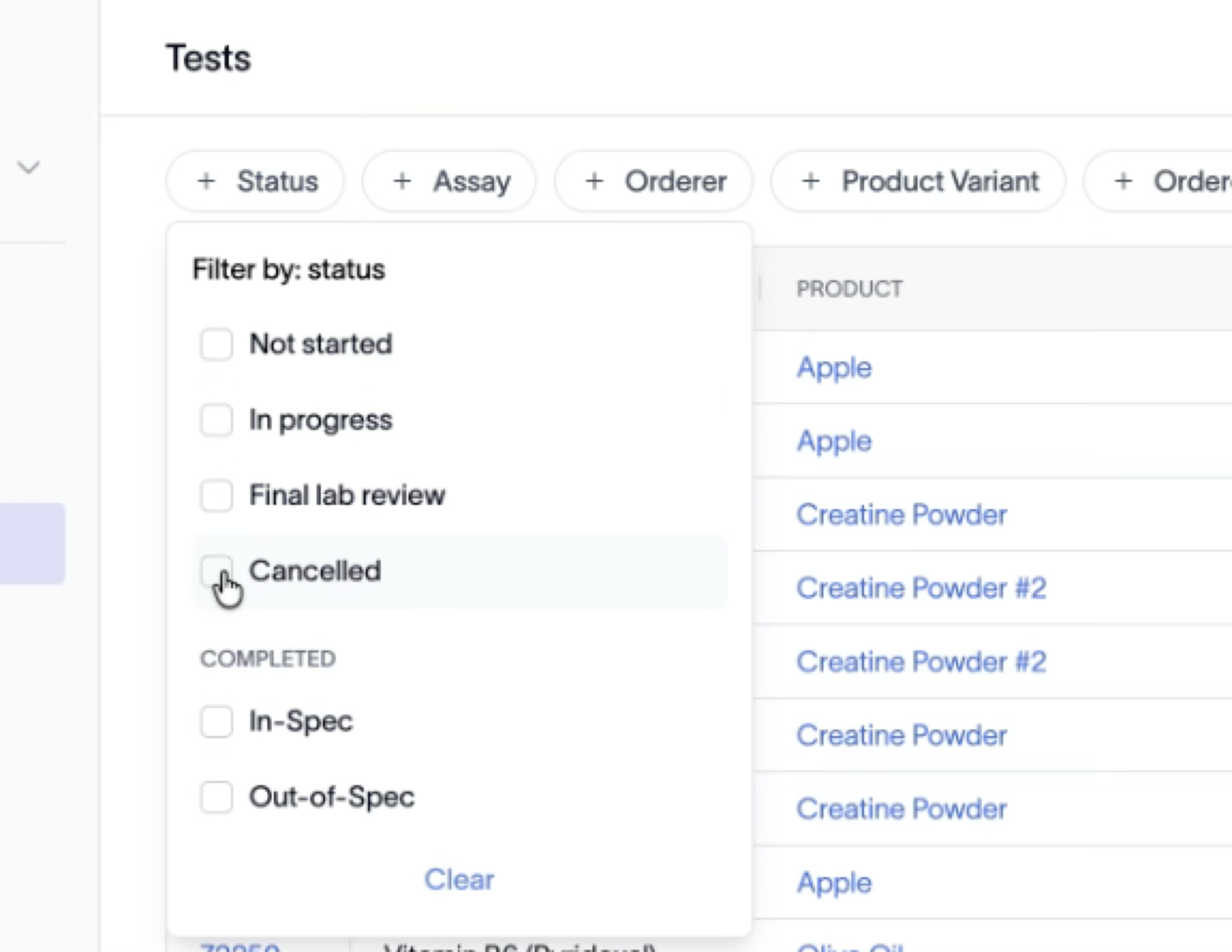
Click any filter chip above the table: Status, Assay, Orderer, Product Variant, Ordered At, or Completed At.
2. Choose values
Tick the values you want. For Status, you can pick Not started, In progress, Final lab review, Cancelled, or a Completed result type (In-Spec, Out-of-Spec, No spec listed). The list reloads as soon as you select. Use Clear at the bottom of a dropdown to clear that one filter.
3. Stack filters and pick date ranges
Apply more than one filter at a time — for example, Orderer plus Ordered At. Applied filters show as filled chips (for example, Orderer: Anthony Nadaletti). Use Ordered At and Completed At to pick a date or month (for example, ordered in May and completed in May).

4. Reset when you're done
Click Reset filters on the right of the filter row to clear every active filter at once.
Outcome
The table shows only the tests matching your filters. Reset clears them all in one click.